
What is satellite messaging on phones and how it works
Key takeaways
- Satellite messaging lets a phone send texts directly to satellites in orbit when there is no cellular or Wi-Fi signal, using only a clear view of the sky.
- Apple's iPhones (14 and newer) offer Emergency SOS and two-way Messages via satellite; T-Mobile's Starlink service works on ordinary recent phones with no special hardware.
- Only plain text gets through: no photos, no voice calls, and messages can take 30 to 60 seconds each, with weather and trees slowing things further.
Deep in the mountains, far offshore, or on a desert road with zero bars, your phone is normally a brick. Satellite messaging changes that by letting the phone's radio talk directly to a satellite overhead, sending and receiving plain text messages through space with no cell towers involved.
It is not science fiction anymore. Apple has shipped it on iPhones since 2022, Google's Pixel 9 added its own version in 2024, and T-Mobile's Starlink partnership brings satellite texting to ordinary recent phones.
This article explains what satellite messaging is, how the signal actually travels, what Apple, Android, and carriers each offer, what you can and cannot send, the limits nobody advertises, and how to use it.

What is satellite messaging?
Satellite messaging is texting without towers. When your phone has no cellular and no Wi-Fi, it can switch to a special satellite mode and beam short text messages straight up to a satellite passing overhead.
The satellite relays the message down to a ground station, which routes it into the normal messaging or emergency-response network. The reply comes back the same way. Because satellites move fast and the radio link is weak, everything about the experience is slower and more limited than normal texting, which is the trade the technology makes for working literally anywhere with a view of the sky.
Two different ideas share this name, and keeping them apart helps. Phone-maker satellite features, like Apple's, need dedicated satellite hardware in the phone and only work on newer models. Carrier satellite services, like T-Mobile's with Starlink, use the phone's ordinary cellular radio to talk to satellites, so most recent phones work with no special hardware at all.
How it works: your phone talks to space
Take Apple's system as the clearest example, since Apple has documented it in detail.
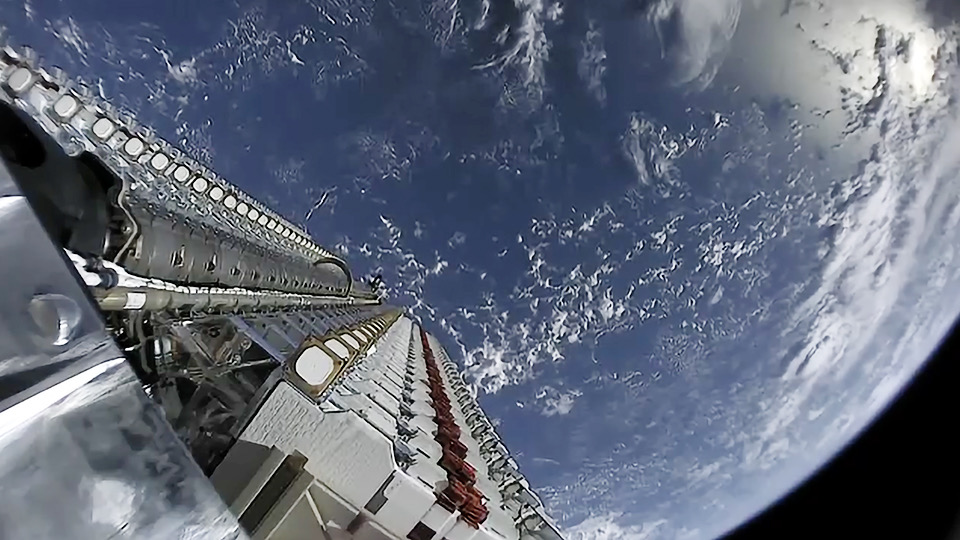
When you trigger Emergency SOS via satellite, your iPhone connects to one of Globalstar's 24 satellites in low-Earth orbit, traveling at roughly 16,000 mph.
Apple described the chain in its 2022 announcement: the message "is received by one of Globalstar's 24 satellites in low-earth orbit traveling at speeds of approximately 16,000 mph," then sent down to custom ground stations at key points worldwide. From there it goes to local emergency services, or to an Apple-trained relay center when local dispatchers cannot take texts. Apple backed the infrastructure with a $450 million investment from its Advanced Manufacturing Fund.
The hard physics constraint is line of sight. The phone needs a clear view of the sky and the horizon. Your iPhone shows on-screen guidance to help you point it at the passing satellite, and because the satellites move quickly, you periodically rotate the phone as they travel.
Apple says a message can send in about 15 seconds under ideal conditions, but light or medium foliage can stretch that past a minute. Heavy tree cover, mountains, canyons, or tall buildings can block the connection entirely.
The bandwidth is tiny by design, so only text survives the trip. Supported: plain text, emojis, and Tapbacks.
Not supported: photos, videos, audio messages, stickers, location pins, group chats, read receipts, and typing indicators. There are no voice calls over these links.
Apple vs Android vs carriers: who offers what
Apple has two separate features, and the names matter. Emergency SOS via satellite launched in November 2022 with the iPhone 14 and iOS 16.1, initially in the US and Canada. It is emergencies only: a guided questionnaire collects what is wrong, then sends your location, altitude, battery level, and Medical ID to responders.
Messages via satellite arrived with iOS 18 in September 2024 and is the bigger deal for most people: ordinary two-way texting with any contact, not just emergencies. iMessage conversations stay end-to-end encrypted over satellite; SMS is limited to 140 characters per message, and strangers can only reply after you message them first. Hands-on testing by TidBITS measured 30 to 60 seconds per message and a 500-character limit for satellite iMessage.
Both require an iPhone 14 or newer. The satellite hardware is physical, so iPhone 13 and older cannot gain it through software. Apple also added Find My location sharing via satellite (updates every 15 minutes) and, in some regions, roadside assistance via satellite, which is pay-per-use for non-members.
Android had a rockier path. Qualcomm announced Snapdragon Satellite with Iridium at CES 2023, but the partnership was terminated in November 2023 after phone makers declined to adopt it, according to Iridium's own investor announcement. Google then shipped Satellite SOS on the Pixel 9 series in August 2024 for US users, powered by the satellite operator Skylo with Garmin's 24/7 Response Team handling emergencies. Per Skylo's technical description via Android Central, the phone transmits on a 3.75 kHz high-energy signal to reach the satellite.
Carriers took the third route. T-Mobile's direct-to-cell service with Starlink entered public beta in February 2025 and needs no special phone hardware: it connects to satellites using the phone's ordinary cellular radio on T-Mobile's spectrum, and works on most smartphones from the last four years. The satellites sit 200-plus miles up traveling over 17,000 mph, and T-Mobile says the service covers more than 500,000 square miles of dead zones, which it describes as nearly the size of two Texases. During the beta, texting works much like normal texting, including group texts and reactions; picture messaging, data, and voice are planned for later.
What you can and cannot send
The honest summary fits in one paragraph: short text works, everything rich does not.
On Apple's Messages via satellite you can exchange iMessages and SMS with individuals, use emojis, and send Tapback reactions. You cannot send photos or videos, make voice or video calls, share live locations, run group chats, or use message effects. The limits are not Apple being stingy; they are what the thin satellite link can physically carry.
T-Mobile's Starlink beta is the exception that proves the rule: because it rides on a different architecture with more capacity, group texts and reactions work there, and richer features are on the roadmap.
Character limits are strict everywhere else. Satellite iMessage caps at 500 characters and satellite SMS at 140, per TidBITS's hands-on testing.
Pixel 9's Satellite SOS limits follow-up messages to 168 characters. Write short.
The limits nobody advertises
Satellite messaging is genuinely useful, and it is also easy to overestimate. Five limits deserve to be stated plainly.
First, it is not real-time chat. Even in good conditions, messages take 30 to 60 seconds each way. A back-and-forth conversation that takes a minute over cellular can take ten minutes over satellite.
Second, the sky must be visible. Indoors, under dense forest canopy, in a canyon, or between tall buildings, it may not connect at all. This is a clear-sky technology.
Third, weather and foliage cost time. Apple's own guidance says light to medium foliage can push send times from 15 seconds to over a minute, and the TidBITS testing found similar sensitivity in practice.
Fourth, it is one message at a time, on the phone-maker systems. You point, you wait, you send, you wait for the reply window. It rewards patience and short messages.
Fifth, availability is regional and evolving. Apple's service launched US and Canada first and has expanded country by country since.
T-Mobile's service is tied to its network and plans. Check current coverage before depending on it for a trip.
How much does it cost?
So far, less than anyone expected. Apple promised Emergency SOS via satellite free for two years from November 2022, then extended it by a year for iPhone 14 owners in November 2023, and has kept extending it since; as of September 2026 it remains free for iPhone 14, 15, and 16 models, and Apple has never announced paid pricing.
T-Mobile's Starlink beta was free during the public beta period. After the beta, the company priced it at $15 per month per line on non-premium plans, included free on its Go5G Next plan, and $20 per month for AT&T and Verizon customers who want it, per the February 2025 announcement.
Try the demo before you need it
Both platforms let you practice. On iPhone, go to Settings, then Emergency SOS, and run the satellite connection demo to learn how to aim the phone before you are actually off-grid.
Google's Pixel has a similar demo under Settings, then Safety and emergency, then Satellite SOS. Two minutes of practice in the backyard beats figuring it out on a mountainside.

The bottom line
Satellite messaging gives your phone a lifeline where towers cannot reach: short texts beamed to orbit and relayed to ground stations, then on to emergency services or your contacts. Apple's version needs an iPhone 14 or newer and a clear sky; T-Mobile's Starlink version works on ordinary recent phones; Pixel 9 covers the Android side.
Expect 30-to-60-second message times, text only, and no connection without a view of the sky. If you hike, sail, or drive remote roads, set it up and run the demo before you leave. It is the kind of feature you want to meet for the first time at home.
For more on the wireless tech that keeps you connected closer to home, see our plain-English Wi-Fi 7 vs Wi-Fi 6E comparison. And if you are curious about the login tech on the phone in your hand, our passkey setup guide for Google accounts walks through going passwordless.
Tags: satellite messaging, iPhone, Starlink, emergency SOS
Latest in Tech
- WiFi 7 vs WiFi 6E, explained for normal people
- How to set up a passkey on your Google account step by step
- Why do some websites still not offer passkey login?
Subscribe for one practical tech explainer a day, written from real sources.
Related stories

Apple plans two October launches: smart home hub, OLED MacBook Pro
Apple set October 13 for a smart home launch with a new hub, Apple TV 4K and HomePod mini, then October 27 for OLED MacBook Pro models

How to Check If Your Phone Supports eSIM in 30 Seconds
Dial *#06# and look for an EID number to confirm eSIM support in under 30 seconds. This guide also walks through the iPhone and Android

eSIM vs iSIM: what is the difference?
An eSIM is a dedicated chip on the phone's board, while an iSIM lives inside the processor itself. Qualcomm's Snapdragon 8 Gen