
Why Do Email Newsletters Land in Spam Even When You Subscribed
Key takeaways
- Mailbox providers judge the sender's reputation and authentication, not your subscription, when placing email.
- Missing or broken SPF, DKIM, or DMARC records is the most common reason legitimate newsletters land in spam.
- Google and Yahoo require bulk senders to keep spam complaint rates under 0.3%, about 3 complaints per 1,000 messages.
You signed up for the newsletter. You confirmed the subscription. You even wanted the emails.
Yet the next issue slides silently into your spam folder, unread.
This happens to millions of readers every day, and the explanation has little to do with the words in the email. Mailbox providers like Gmail, Outlook, and Yahoo run every incoming message through a trust check before deciding where it goes.
Your subscription is one small input. The sender's reputation and technical setup carry far more weight.
This article takes a closer look at how that trust check works, why authentication failures are the biggest culprit, what else drags a newsletter into spam, and what both senders and subscribers can do about it.
It is your sender's reputation, not your subscription
When a newsletter arrives, the receiving server asks a simple question: is this sender who they claim to be, and can I trust them? The answer comes from the sender's history and technical credentials, not from your signup form.
Every domain that sends email builds a reputation over time. Providers track how many of its messages get marked as spam, how often recipients open them, and whether the domain follows the rules.
A strong reputation earns the inbox. A weak one earns the spam folder.
Your subscription does not override this. The provider protects all its users, so one person's opt-in cannot force delivery. Think of it like a bouncer at a club: your name being on a list matters less than whether the venue trusts the person who put you there.
Reputation also explains the odd pattern where a newsletter lands in your inbox for months, then suddenly starts going to spam. Something changed on the sender's side. Complaint rates crept up, or a technical record broke, or the sending server's IP address picked up a bad neighbor.
The three authentication checks most senders fail
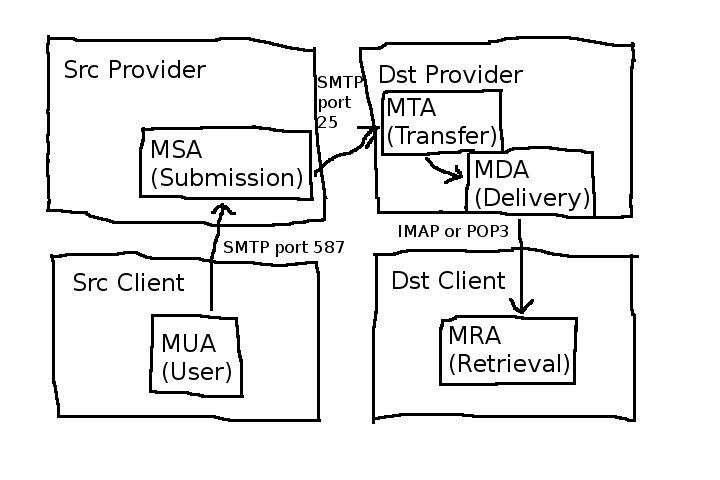
The most common reason legitimate newsletters land in spam is failed authentication. SMTP, the protocol that moves email, was designed in the 1980s when everyone on the network was trusted.
It has no built-in way to prove that a message claiming to come from your domain actually did. Anyone can type anything in the From field.
Three standards were layered on top to fix this, and they work as a team.
SPF (Sender Policy Framework) is the guest list. It is a DNS record naming the servers allowed to send email for a domain. When a message arrives, the receiving server checks whether the sending server is on the list. The specification allows exactly one SPF record per domain, according to Internet Solutions, and two records produce a permanent error that fails every message. SPF also caps out at 10 DNS lookups, so authorizing every tool a sender has ever tried can silently break the record.
DKIM (DomainKeys Identified Mail) is the wax seal. The sending platform signs each outgoing message with a private key, and receiving servers verify the signature against a public key published in the domain's DNS. If anyone tampers with the message in transit, the seal breaks and the check fails.
DMARC (Domain-based Message Authentication, Reporting, and Conformance) is the bouncer. It looks at the SPF and DKIM results and tells the receiving server what to do when they fail: deliver anyway, quarantine the message into spam, or reject it outright.
For years, authentication was a best practice that small senders could skip. That ended when Google and Yahoo made it mandatory for bulk senders.
Anyone sending more than 5,000 messages a day to Gmail or Yahoo users must now have SPF, DKIM, and DMARC in place, according to both PodSubs and Internet Solutions. An unauthenticated domain is indistinguishable from a spoofed one, and spammers fake sender domains constantly, so providers treat unverified mail with suspicion.
The 0.3% complaint rate that ruins good newsletters
Even authenticated senders can lose the inbox. Google and Yahoo set a strict spam complaint threshold for bulk senders: the complaint rate must stay under 0.3%. As beehiiv explains, that means just 3 subscribers out of 1,000 marking a message as spam pushes the sender toward trouble.
Complaint rates creep up for ordinary reasons. A reader forgets they subscribed and hits the spam button instead of unsubscribing.
A list grows stale and old addresses turn into spam traps. A sender changes topics or increases frequency and annoyed readers report the mail.
Low engagement makes things worse. If most recipients never open the newsletter, providers read that as a signal that the mail is unwanted. The pattern compounds: fewer opens, worse placement, even fewer opens.
Shared sending infrastructure adds another risk. Many newsletter platforms route mail from many senders through the same IP addresses.
If one sender on a shared IP blasts spam, the IP's reputation drops and every newsletter sent through it can land in spam. This is why why some messages show as green and others as blue matters less than the path the message took to reach you.
List hygiene is the quiet fix. Senders who remove inactive addresses, use confirmed opt-in, and make unsubscribing easy keep complaint rates down. The irony is that making it easier to leave often improves inbox placement for everyone who stays.
Why your provider is stricter than it used to be
Spam filters have grown more aggressive over the past few years, and the bar keeps rising. The bulk-sender rules from Google and Yahoo pulled the whole industry forward. Filters everywhere now treat unauthenticated mail with more suspicion, even from small senders who fall below the formal thresholds.
Machine learning models at the big providers now weigh hundreds of signals. Sending patterns, link reputation, image-to-text ratios, and even how quickly recipients delete messages without opening all feed into the decision. A newsletter that looked fine in 2020 can land in spam today without the sender changing a thing.
This strictness protects users. Phishing and scam email still cause enormous losses, and providers would rather over-filter a newsletter than let a lookalike scam through. The cost of that caution is that legitimate mail sometimes gets caught in the net.
What you can do as a subscriber
If a newsletter you want keeps landing in spam, the fastest fix is to train your own filter. Open the spam folder, select the message, and mark it as not spam. Then move it to your inbox.
Add the sender's address to your contacts. Most providers treat mail from contacts as wanted by default. Some providers also let you create a filter that forces messages from a specific address into the inbox.
Reply to the newsletter occasionally. Replies signal engagement to the provider, which strengthens the sender's standing with your mailbox. Even opening the message regularly helps.
Check whether the sender offers a double opt-in or a preference center. Senders who confirm subscriptions tend to have cleaner lists and better deliverability. If the newsletter never asked you to confirm, its list may be part of the problem.
What senders should check first
For anyone sending newsletters, the diagnostic order is short.
First, verify the three authentication records. Send a test message to a Gmail account and inspect the headers for spf=pass, dkim=pass, and dmarc=pass. Confirm that the DKIM signing domain matches the visible From domain.
Second, check the complaint rate. Google Postmaster Tools shows it for Gmail traffic. If it is climbing toward 0.3%, prune the list before the next send.
Third, look at engagement. If open rates have fallen off a cliff while nothing changed in content, the placement shifted first and the opens followed.
Fix the technical trust signals before rewriting subject lines.
Fourth, make unsubscribing genuinely easy. One-click unsubscribe is now required by Google and Yahoo for bulk senders anyway. Hiding the unsubscribe link buys a few retained subscribers and costs far more in spam complaints.
FAQ
Does buying a bigger email list cause spam placement?
Yes, indirectly. Purchased or scraped lists contain addresses that never opted in, and those recipients mark the mail as spam. The complaint rate spikes, the domain reputation drops, and future messages land in spam for everyone, including people who subscribed properly.
Will switching newsletter platforms fix deliverability?
Only if the platform was the problem. Moving to a new platform can help if the old one used shared IPs with a poor reputation. But if the sender's own domain lacks SPF, DKIM, and DMARC records, the new platform inherits the same failed trust check.
Do spam trigger words still matter?
Far less than reputation folklore suggests. Words like "free" or "guarantee" can contribute to a spam score, but providers now weigh sender reputation and authentication far more heavily. A trusted sender can use the word "free" all day; an unauthenticated one gets filtered with a perfectly innocent subject line.
Why does the newsletter reach my phone but not my desktop?
Different providers and apps apply different filters. The mobile app may use the provider's server-side filtering while a desktop client applies its own local rules, or vice versa. Check both the server-side spam folder and any client-side junk rules.
The bottom line
Newsletters land in spam because mailbox providers trust the sender's reputation and authentication setup more than your subscription. The 5,000-message bulk threshold, the three DNS records, and the 0.3% complaint ceiling are the numbers that decide placement.
Subscribers can retrain their filters with a few clicks. Senders need to treat authentication and list hygiene as infrastructure, not extras. The inbox is earned one verified, wanted message at a time.
Latest in Tech
- Why do some messages show as green and others as blue?
- Why does your phone dim the screen in sunlight even at full brightness?
- Samsung News app is shutting down in December
- How does a contactless payment reach your bank after you tap?
Want one practical explainer like this in your inbox every morning? Subscribe to the Rive News newsletter.
Related stories

Apple plans two October launches: smart home hub, OLED MacBook Pro
Apple set October 13 for a smart home launch with a new hub, Apple TV 4K and HomePod mini, then October 27 for OLED MacBook Pro models

How to Check If Your Phone Supports eSIM in 30 Seconds
Dial *#06# and look for an EID number to confirm eSIM support in under 30 seconds. This guide also walks through the iPhone and Android

eSIM vs iSIM: what is the difference?
An eSIM is a dedicated chip on the phone's board, while an iSIM lives inside the processor itself. Qualcomm's Snapdragon 8 Gen